
Azure hub-and-spoke network diagram
The short version: The hub-and-spoke pattern puts shared services (firewall, gateway, DNS) in a central hub VNet and connects each workload in its own spoke VNet by peering. This free, editable template shows the layout — open it in Calma Studio to adapt it and export to Bicep, Terraform or ARM. Open this template →
What it shows. A hub VNet holding the shared components — Azure Firewall (or an NVA), a VPN/ExpressRoute gateway, and shared DNS — with two or more spoke VNets peered to it, each carrying a workload. Traffic between spokes and to on-premises flows through the hub, so inspection and policy live in one place.
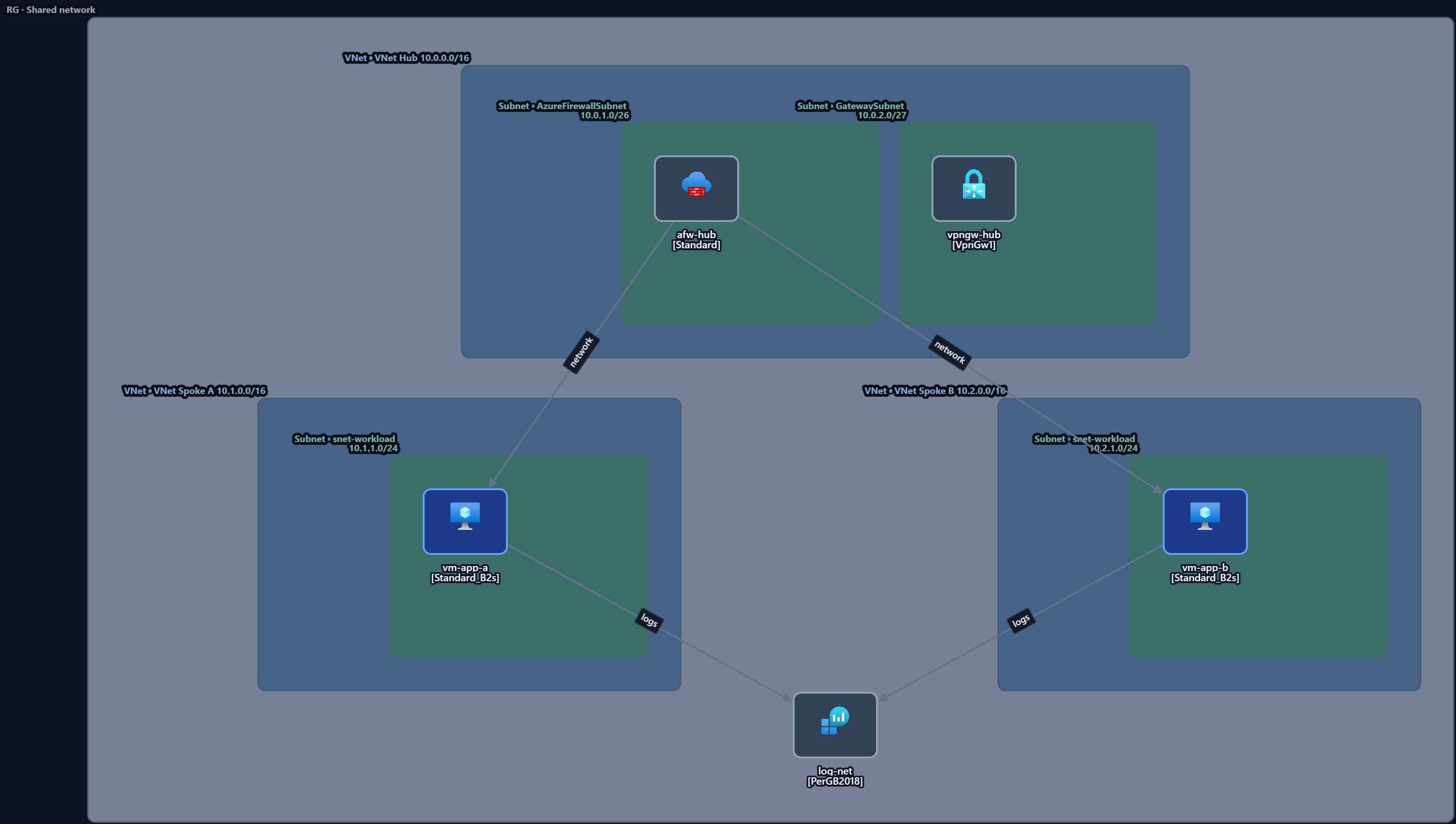
Key components
| Component | Role in the pattern |
|---|---|
| Hub VNet | Home for shared networking and security services |
| Azure Firewall / NVA | Central egress filtering and traffic inspection |
| VPN / ExpressRoute gateway | Hybrid connectivity to on-premises |
| Spoke VNets | One per workload or team, peered to the hub |
| VNet peering | Connects each spoke to the hub (not spoke-to-spoke directly) |
When to use it. When multiple workloads or teams share connectivity and you want central control of egress, inspection and hybrid links without duplicating them per workload.
When not to. A single workload with no hybrid connectivity rarely needs the hub — a flat VNet is simpler and cheaper.
Make it yours. Open the template in Studio, add your spokes, set regions and tags, then export to code.
Open the hub-and-spoke template — free →
FAQ
- What's the difference between hub-and-spoke and a flat VNet? Hub-and-spoke centralises shared services and inspection in the hub; a flat VNet mixes everything in one network with less isolation.
- Do spokes talk to each other directly? By default, no — traffic routes through the hub, where inspection and policy live. You can add direct peering if a workload genuinely needs it.
- Can I export this to Terraform or Bicep? Yes — edit it in Studio and export to Bicep, Terraform or ARM.
- Is the template free to use? Yes, free and editable, no signup.