
Azure microservices diagram (Container Apps)
The short version: This template shows a microservices architecture on Azure Container Apps — a Container Apps environment hosting several services, ingress, an asynchronous messaging layer, and a data store — without the operational weight of Kubernetes. Free and editable in Calma Studio, with export to Bicep, Terraform or ARM. Open this template →
What it shows. A Container Apps environment running several independent services, with ingress routing external traffic, a Service Bus (or queue) decoupling them asynchronously, images from Azure Container Registry, and a data store (Cosmos DB or Azure SQL). Log Analytics backs the environment for telemetry.
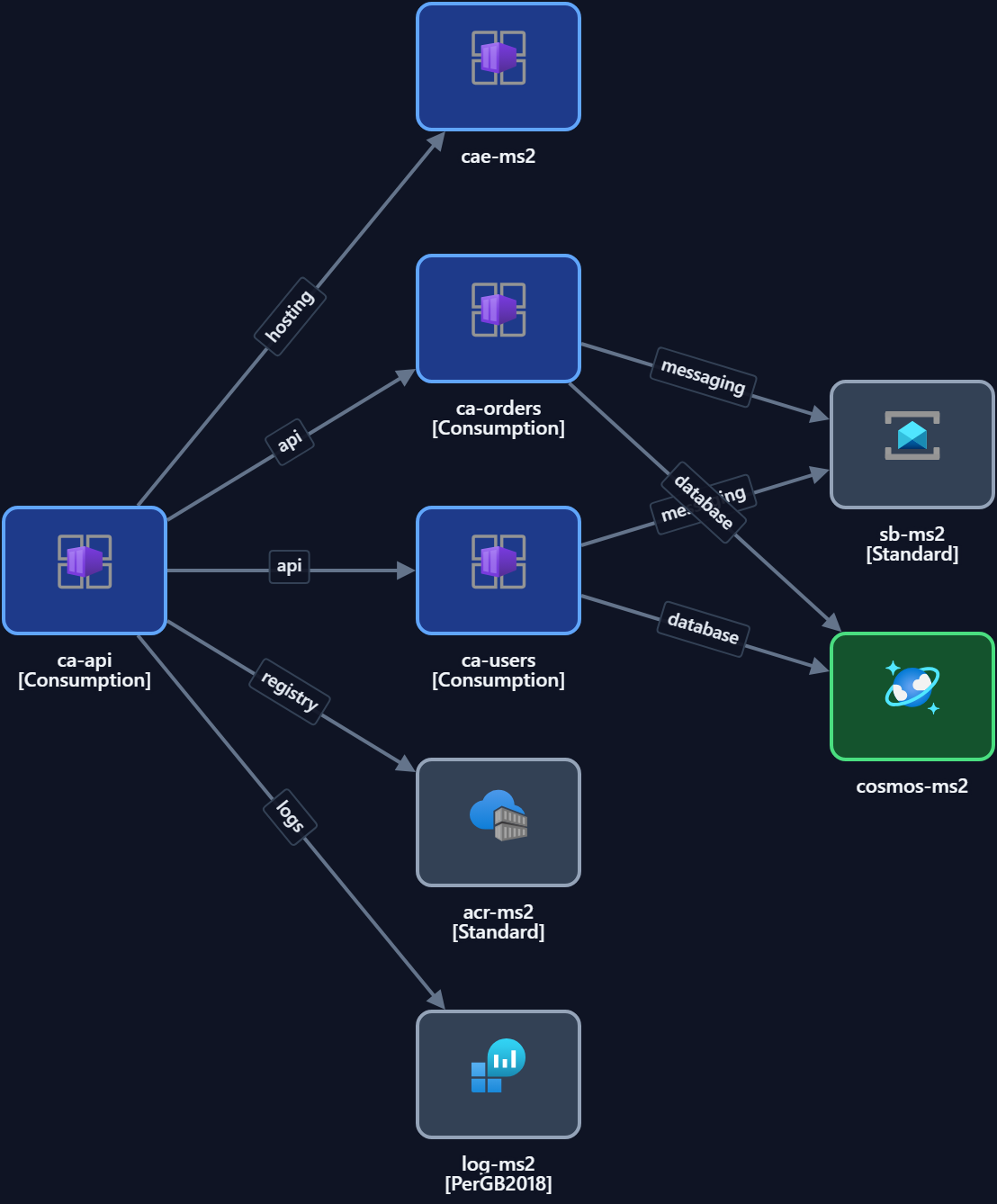
Key components
| Component | Role |
|---|---|
| Container Apps environment | Managed, serverless container host |
| Container apps (services) | Independently deployable microservices |
| Ingress | External routing to services |
| Service Bus / queue | Asynchronous, decoupled messaging |
| Azure Container Registry | Private image registry |
| Cosmos DB / Azure SQL | Data store |
When to use it. Microservices where you want serverless containers, scale-to-zero and simple deployment — without running and patching a Kubernetes cluster.
When not to. If you need full Kubernetes control (custom operators, complex scheduling), use the AKS pattern instead.
Make it yours. Open it in Studio, add your services and messaging, set regions and tags, then export to code.
Open the Container Apps template — free →
FAQ
- Container Apps vs AKS? Container Apps is serverless and simpler; AKS gives full Kubernetes control.
- Does it include async messaging? Yes — a Service Bus / queue decouples the services.
- Can I export it to IaC? Yes — Bicep, Terraform or ARM from Studio.
- Is it free? Yes, free and editable, no signup.